Darbuka Virtual
- 4.3
- Rating
- 1.00M
- Installs
- Free
- Price
 Analysis by App-foxy
I enjoy music apps that let me make noise quickly, without turning a five-minute break into a lesson in menus and settings. Darbuka Virtual takes that direct approach. It turns an Android phone into a playable darbuka, so I can tap rhythms with my fingers and try to cover familiar songs wherever I happen to be. It is a free music game from Developer Receh, aimed at Everyone, and its appeal is easy to understand: there is no instrument to carry, tune, or store.
That simplicity is also the key to deciding whether it belongs on your phone. I would not choose it as a replacement for a physical darbuka or a full music-production workstation. I would choose it for casual rhythm practice, quick entertainment, and anyone curious about the instrument’s basic feel. The important question is not whether it offers every possibility found in a professional alternative. It is whether a virtual darbuka gives you enough immediate fun and useful rhythm feedback for the way you actually want to play.
What to consider before choosing a virtual darbuka
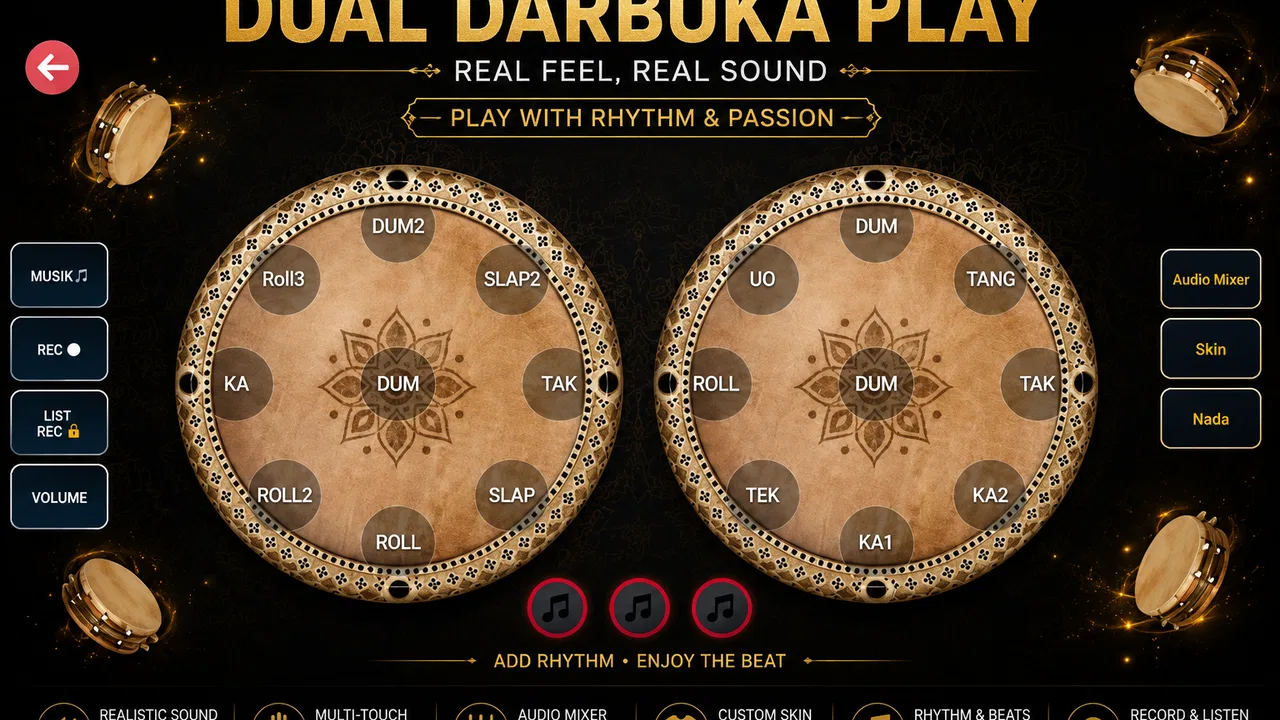
My first decision criterion is immediacy. A virtual percussion app should make it obvious where to tap and respond quickly enough that a simple beat feels connected to my hands. Darbuka Virtual works best when I treat it as a compact rhythm toy rather than a complete course. I can open it, start tapping, and experiment without preparing a kit or finding a quiet place for a full-size instrument.
You May Also Like

 Blood Strike: 2.5 Anniversary
Blood Strike’s Loadouts Turn Every Drop Into a Tactical Gamble
A close look at Blood Strike’s custom loadouts: how fast access to signature weapons reshapes its battle royale rhythm, rewards preparation, and narrows the gap between fights.

 Pandora - Music & Podcasts
Pandora’s Music Is Easy to Start, but Harder to Recover
Pandora’s strength is its low-effort path from a seed to a station. Its weak spot is how much confidence it asks you to place in connection, setup, and quiet recovery.

 8 Ball Pool
 Is Built on Rivalries, Rematches, and Routine
A close look at the rivalries, rematches, shared routines, and unanswered safety questions that turn a quick pool match into a persistent mobile community.

 Samsung Music
’s Quiet Strength Is Playing What You Already Own
Its reach comes less from spectacle than from dependable access to a personal library. That simplicity is both the app’s strongest retention engine and its ceiling.

 AccuWeather: Weather Radar
AccuWeather Review: A Quick, Clear Forecast for Everyday Decisions
For everyday plans, the best forecast is the one you can understand quickly. AccuWeather makes rain timing, radar, and local conditions easy to act on, with a few trade-offs.

 Hill Climb Racing
Why Hill Climb Racing Still Turns Crashes Into One More Run
A tiny car, a bumpy hill and one more upgrade: Hill Climb Racing keeps resurfacing because its simple chaos makes every near-miss feel personal.
More From Our News Desk



The second criterion is musical purpose. If your goal is to relax by copying the pulse of a song, a touch-based game can be enjoyable. If your goal is to build disciplined technique, hand endurance, detailed articulation, or stage confidence, a phone screen is a much narrower tool. The surface is flat, the sound comes from a speaker or headphones, and the physical response is nothing like a stretched drumhead. That difference matters more as your playing becomes serious.
I also consider the phone itself. A small screen may make two-handed patterns feel cramped, while a larger display gives the fingers more room to separate. The device’s speaker can change how satisfying each hit feels, and using headphones may make the sound easier to follow in a noisy room. These are practical details, not flaws unique to this game, but they strongly affect whether the experience feels playful or frustrating.
There is another useful distinction between a virtual darbuka and ordinary rhythm games. Many rhythm games ask me to follow prompts, lanes, or timed targets. Darbuka Virtual is more open-ended: the attraction is tapping the instrument directly and shaping a beat myself. That makes it a better fit for spontaneous practice than for someone who wants a score-driven challenge with a clearly defined progression.
How I use it in ordinary situations
A realistic use case is a short break while waiting for an appointment. I can spend a few minutes trying a steady pulse, then add a faster accent when the basic pattern feels comfortable. I do not need to unpack anything, and I can stop immediately when my name is called. The same routine works on a commute if I can tap quietly, although I would keep the volume low and avoid disturbing other passengers.
It can also help a beginner understand the idea of keeping time. I might play a simple repeating pattern while counting evenly in my head, then see whether my hands stay consistent when I change the accent. This is not a formal lesson, but it encourages listening and coordination. The most valuable habit is to begin slowly rather than chase speed. A clean, repeatable beat teaches more than frantic tapping.
For song covering, I would use a short section rather than attempt an entire performance immediately. I can listen for the main pulse, tap along, and simplify the rhythm until it feels stable. That workflow turns the app into a lightweight accompaniment tool. It is especially suitable for experimenting with whether a song’s groove feels natural on darbuka before investing time in a physical instrument.
Where Darbuka Virtual wins
The strongest advantage is accessibility. A physical darbuka asks for money, space, storage, and a willingness to make real volume. This game removes those barriers. It is free, and its minimum operating requirement is Android 6.0, so it can reach people using older compatible phones instead of demanding a recent device. That makes it a sensible first step for curious beginners.
I also like the low commitment. Downloading a virtual instrument is easier to justify than buying one after a passing interest. If I discover that hand percussion is not for me, I have lost very little time and no equipment budget. If I enjoy it, the app gives me a way to keep exploring between opportunities to try a real drum.
The direct tapping model is another strength. There is a satisfying difference between pressing a generic play button and interacting with a representation of the instrument. Even simple patterns feel more personal when I choose where to strike and when to leave space. That makes the experience more engaging than passively listening to a looping rhythm.
Its audience size also suggests that the format has found a practical niche. Darbuka Virtual has passed one million installs and holds a 4.3 average from roughly one thousand ratings. I do not treat those figures as proof that it will suit every player, but they indicate that the concept is easy for many people to understand and try. The app has been available since September 8, 2019, which also gives it a longer presence than a brand-new experiment.
Version 1.88 is the current version, and I would keep the app updated through the normal store process when an update is offered. That is less about expecting new capabilities and more about keeping the installed version aligned with the developer’s maintained release. Developer Receh has kept this small music game focused on its central idea rather than turning it into an unrelated collection of tools.
Small techniques that make the experience better
My first practical tip is to create a repeatable hand position before playing quickly. I place the phone securely, keep my wrists relaxed, and use small finger movements instead of striking the screen with unnecessary force. This reduces accidental taps and makes a repeating beat easier to control. On a slippery surface, a case or a stable table can be more useful than trying to hold the device in midair.
My second tip is to separate practice into pulse and decoration. I start with one consistent beat, listen for whether the spacing remains even, and only then add variations. This prevents the common mistake of confusing a complicated pattern with a good one. The app is most helpful when I use its immediate response to check my timing, not when I treat every tap as a race.
A third useful workflow is to record the rhythm mentally rather than relying only on visual tapping. I close my eyes briefly, keep the pattern going, and listen for gaps that become too long or accents that arrive early. A screen encourages visual attention, but darbuka playing is ultimately about sound and timing. This exercise exposes whether I am following a genuine pulse or merely reacting to my fingers.
I would also compare the phone’s speaker with headphones before deciding that the sound feels weak. A small speaker may blur quick hits, while headphones can make the contrast easier to hear. On the other hand, headphones can make me tap too aggressively if the volume is high. Moderate volume is the safer choice, especially during longer sessions.
Where a different category may fit better
A physical darbuka is the better option for anyone who wants authentic hand feedback, natural resonance, or serious technique development. The real instrument responds to pressure and placement in ways a flat touchscreen cannot reproduce. It also teaches practical skills such as controlling volume, muting, and managing the instrument’s position. Darbuka Virtual can prepare your interest, but it cannot duplicate that physical relationship.
A drum-machine or music-production app is more suitable when your priority is building a complete arrangement. Those apps usually focus on sequencing, layering, editing, and saving musical ideas rather than directly imitating one hand drum. I would choose that category for composing a track. I would choose this game when I want to play the rhythm myself in the moment.
A structured music-learning app may be a better fit for someone who needs lessons, notation, guided exercises, or measurable progression. Darbuka Virtual gives me room to explore, but that freedom can feel directionless if I am waiting for a teacher-like path. Beginners who lose motivation without instructions should consider a learning-focused alternative, then return to this game for casual repetition.
General rhythm games can also be preferable for players who want challenges, levels, visual timing cues, and a stronger sense of completion. Their advantage is game structure. Darbuka Virtual’s advantage is the feeling of touching the instrument directly. The choice depends on whether you want to perform your own pattern or react to a designed challenge.
Limitations worth accepting before you install
The biggest limitation is the touchscreen itself. Fingers do not receive the rebound and surface tension of a drumhead, so the app cannot fully train physical technique. Long sessions may also become awkward if the phone is not positioned comfortably. I would treat it as supplementary practice and entertainment, not as a substitute for regular time with a real darbuka.
The open-ended design may feel thin to players who expect a campaign, unlockable content, or a detailed scoring system. Its pleasure comes from tapping and experimenting, so users who need constant goals may run out of reasons to return. That is not necessarily a problem for a casual music game, but it is an important trade-off before choosing it over a more structured alternative.
Another limitation is the gap between playing along with a song and truly covering it. A phone can help me catch the pulse, but it does not automatically teach the exact rhythm of every track. I still need to listen carefully, simplify difficult sections, and accept that some songs will not translate naturally to a single virtual drum. The app supports experimentation; it does not remove the musical work.
Privacy and comfort decisions should remain personal. I would check the normal Android installation screen, consider whether I want sound in public, and avoid treating the game as a silent activity unless I mute it. The Everyone content rating makes it approachable for a broad audience, but parents can still decide whether casual tapping is appropriate for a child’s screen time.
The switching cost is unusually low
Moving from another rhythm app to this one should be easy because the central action is familiar: open the instrument and tap. There is no need to replace a physical setup or rebuild a music library simply to try it. I can keep a more advanced app for arranging songs and use this one when I want a fast, hands-on break. In that sense, it works well beside alternatives rather than demanding that one app do everything.
Switching away is just as straightforward if the experience does not suit me. Someone who needs lessons can move to a guided course, while someone who wants authentic technique can buy or borrow a physical drum. The main cost is not money but expectation: if I enter expecting studio tools or professional training, I may judge a deliberately simple game unfairly.
Because it is free, the decision is mostly about storage, attention, and whether virtual tapping feels worthwhile on your device. I would install it during a low-risk trial session, test a steady rhythm, try a song section, and notice whether the touch response keeps me engaged. That short test tells me more than a long feature checklist because the app’s value is experiential.
My recommendation for the right player
I recommend Darbuka Virtual to beginners, casual rhythm fans, and curious listeners who want to try darbuka-style playing without buying an instrument. It is particularly good for short sessions, simple song covers, and building a basic sense of pulse. The free price and Everyone rating make it easy to share with family members who want a playful introduction to hand percussion.
I would skip it if your main goal is professional recording, detailed instruction, authentic physical technique, or a deep progression system. In those cases, a physical instrument, a dedicated learning resource, or a production-focused app will serve you better. This game is not weakened by that distinction; it is simply designed for a lighter commitment.
After using it, my view is that the best way to approach Darbuka Virtual is as a pocket rhythm companion. Keep patterns simple, listen more than you watch, stabilize the phone, and use it to explore songs rather than promise yourself a complete percussion education. For that specific purpose, it earns a place on my device. Its real strength is immediate, low-pressure rhythm play—not pretending to replace the instrument it represents.
FAQs for Darbuka Virtual
01What is Darbuka Virtual, and how does it work?
Darbuka Virtual is a mobile drumming app that simulates the sound and playing style of a darbuka, a traditional goblet-shaped percussion instrument. After opening the app, you tap different areas of the on-screen drum to produce bass, tone, and slap sounds. It is designed for casual experimentation, rhythm practice, and creating simple beats without needing a physical instrument.
02Is Darbuka Virtual suitable for beginners?
Yes, Darbuka Virtual is generally easy for beginners to understand because its controls are based on direct screen tapping. You do not need previous musical experience to start producing sounds and basic rhythms. However, users who want to learn authentic darbuka techniques may need additional lessons, since the app mainly provides a digital playing surface rather than a complete structured percussion course.
03Can I use Darbuka Virtual to practice or create real rhythms?
Darbuka Virtual can be useful for practicing timing, experimenting with common drum patterns, and developing basic hand coordination on a touchscreen. It is especially convenient for quickly repeating rhythms when a physical darbuka is unavailable. Still, the experience is limited by the phone or tablet’s screen size and touch response, so it should be considered a practice aid rather than a full replacement for a real instrument.
04Does Darbuka Virtual require an internet connection?
The core drumming experience in Darbuka Virtual may work without a constant internet connection, which makes it convenient for practicing while traveling or when mobile data is unavailable. Nevertheless, connection requirements can vary depending on the version and platform. Internet access may still be needed for downloading the app, displaying advertisements, checking updates, or accessing any online features included by the developer.
05Is Darbuka Virtual free to download, and are there advertisements?
Darbuka Virtual is commonly offered as a free download, allowing users to try its main drumming functions without purchasing a physical instrument. Like many free mobile apps, it may include advertisements or optional paid elements, depending on the release available for Android or iOS. Before installing, check the official store listing for current pricing, in-app purchases, permissions, and the developer’s privacy information.
Pros
- Responsive touch controls make rhythms easy to play.
- Includes several traditional darbuka sounds and tones.
- Works well for quick practice sessions anywhere.
- Simple interface is suitable for beginners.
- Useful for adding hand-played beats to casual music ideas.
Cons
- Sound quality may vary depending on your device’s speakers.
- Limited features compared with full music production apps.
- Ads may interrupt the playing experience in the free version.
- Advanced players may find the rhythm options too basic.
- Requires precise tapping for consistent and realistic performances.

Darbuka Virtual
Gallery